🤖 AI Agent Design · 2026
Ollie
Your Agentic AI Assistant
Teams remember what was said. Ollie remembers what was decided. Designing organizational memory for teams that run on meetings.
Takes Action
Understands Goals
Delivers Outcomes
Thinks Deeply
View Design Decisions ↓
Role
Product Designer
Duration
4 Weeks
Tools
Figma · Claude · ChatGPT
Research
15 participants
Type
Agentic AI design
Post-meeting work
3–5 min
↓ from 20–30 min
Decisions captured in real time, not after
Context retrieval
20 s
↓ from 5–10 min
Past decisions searchable via structured memory
Task creation time
30 s
↓ from 8–10 min
Captured decisions flow directly to Jira
Approval speed
9/10
Within 20 seconds
Participants approved or rejected decisions instantly
The Problem
Designing organizational memory for teams that run on meetings
The meeting summary was accurate. The decisions had already been forgotten. After every meeting, teams knew what was said. They had to be reminded what was decided, who was responsible, or what happened next.
This case study is about the design of an AI agent that solves that. in real time, not 24 hours after the moment has passed.
"We had high chances of forgetting what was discussed in a meeting that happened for more than an hour."
Research Participant
What Ollie Does
Thinks Deeply
Understands goals, breaks them down, and takes action with minimal human input.
Takes Action
From data analysis to workflow automation, Ollie gets things done across your stack end-to-end.
Delivers Outcomes
Understands goals and delivers outcomes, not just summaries. Drives accountability forward.
Understands Goals
Context-aware across meetings, projects, and teams. not just a single session.
Trusted & Secure
Enterprise-grade security, role-based access and full transparency in every action.
Your Digital Teammate
More than a chatbot, it works 24/7 to drive results. Persistent presence across all workflows.
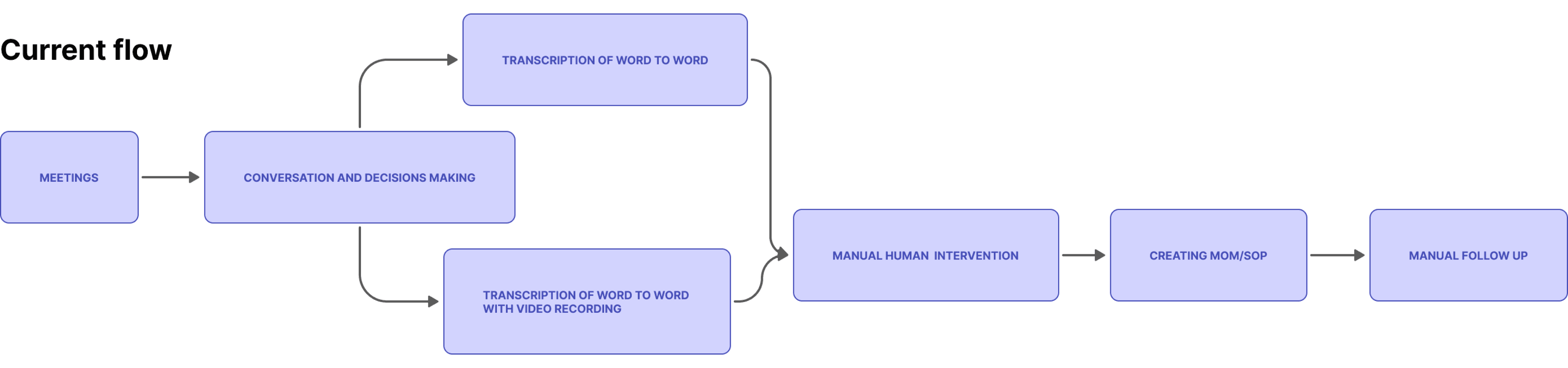
Current Flow : The Broken Process
The core issue: Teams stores meeting transcripts, but users still manually extracted decisions, assigned action items, and created follow-ups after every meeting. By the end of this process, the meeting context that mattered most had either been forgotten, filed incorrectly, or buried in a chat thread no one would reopen.
No Structured Meeting Summaries
Meetings can be recorded and transcribed, but users must manually extract decisions, action items, and follow-ups. Previous meeting context is difficult to track.
Deep Digging Required
This tracking is not possible if a person is not added to the Minutes of Meeting. The digging gets deeper if the meeting was done 3 months back with various teams involved.
Decisions Forgotten
Some decisions were forgotten by the end of the meeting and the person has to go through the whole process or give a command to Copilot. which is a task on its own.
The Insight That Changed Direction
Teams Transcribe is good. Users just had to work on it again.
A participant read through a meeting summary. accurate, complete, well-structured. and said:
"This is accurate. But I have to work on the whole thing again extracting different decisions."
PM participant, usability session
That sentence changed the design direction entirely. The problem was not the quality of the summary. The problem was timing. A meeting summary delivered after the moment of action is not intelligence. It is archaeology.
I assumed the problem was transcription quality. I was wrong. The problem wasn't what was captured. It was when it was captured. This single observation changed the entire design direction from "how do I summarise better" to "how do I make organisational memory available at the moment of decision and future organisational uses."
Constraint
Research & testing scope
This is a 4-week independent concept redesign. Ollie is not built inside Microsoft's engineering environment, and live agent testing was not conducted in this iteration. Every design decision is grounded in primary usability research conducted during the Microsoft Teams redesign with 15 participants.
Fully designed & interaction-tested
Decision capture model, tested with 15 participants
Agent presence and visibility, shown as interactive prototype
Human approval flow, wireframed with approval states
Information architecture layers 1–3 (Teams Experience, Core Experience, Human Review)
Designed but not prototype-tested
Integration layer: architectural design, API flows shown
Organisational memory search: interface shown, retrieval logic mapped
Voice-first experience: conceptual, no interaction testing
Why this matters: Decisions 1–3 are grounded in usability validation. Decisions 4–5 are grounded in gap analysis and architectural thinking. The satisfaction scores reflect feedback on the core three; the remaining layers reflect what would be built next.
Research Methods
User Interviews
In-depth sessions exploring meeting workflows, pain points, and post-meeting habits.
Usability Testing
Task-based testing of interaction flows and prototype concepts with 15 participants.
Interface Audit
Systematic review of existing Teams meeting features and transcription flows.
User Personas
Who Ollie is designed for
PN
Priya Nair
Product Manager · 32 · Bengaluru
3 product squads
5–7 meetings/day
"I leave every meeting with a mental list of what was decided. By the next morning, half of it is gone."
Spends 20–30 minutes after each meeting manually reconstructing decisions. Has perfect transcripts. No time to extract from them.
Goals with Ollie
Real-time decision capture
Auto task assignment
Searchable decision log
Pain points Ollie solves
Decisions buried in transcripts
Action items lost between meetings
No context for new team members
Manual follow-up is error-prone
KM
Karan Mehta
Engineering Lead · 30 · Remote, Bangalore
6 engineers
2 time zones
"I get assigned tasks in meetings that I find out about three days later when someone follows up asking why it isn't done."
Misses meetings. Reconstructs decisions from threads after the fact. Only opens recordings when a disagreement surfaces.
Goals with Ollie
Know commitments before leaving meeting
Instant task notification
Unified commitment inbox
Pain points Ollie solves
Tasks buried in long threads
No visibility across time zones
Follow-ups arrive days too late
Assigned without awareness
01
Decision 1 : Capture Model
Why I designed Ollie to capture decisions in real time instead of generating summaries after the meeting ends
The problem wasn't transcription quality. It was when context became available.
During the Teams usability research, every participant who attended regular meetings had the same post-meeting workflow: open notes, write down what was decided, manually assign tasks, send follow-up messages. This happened after every meeting.
It had become invisible. so routine that no one questioned whether it needed to exist at all.
"This is accurate. But I have to work on the whole thing again extracting different decisions."
Participant reviewing a meeting summary
The summary model is reactive. It generates context after the moment when that context is most needed. The question shifted from "how do I summarise better" to "how do I make organisational memory available at the moment of decision."
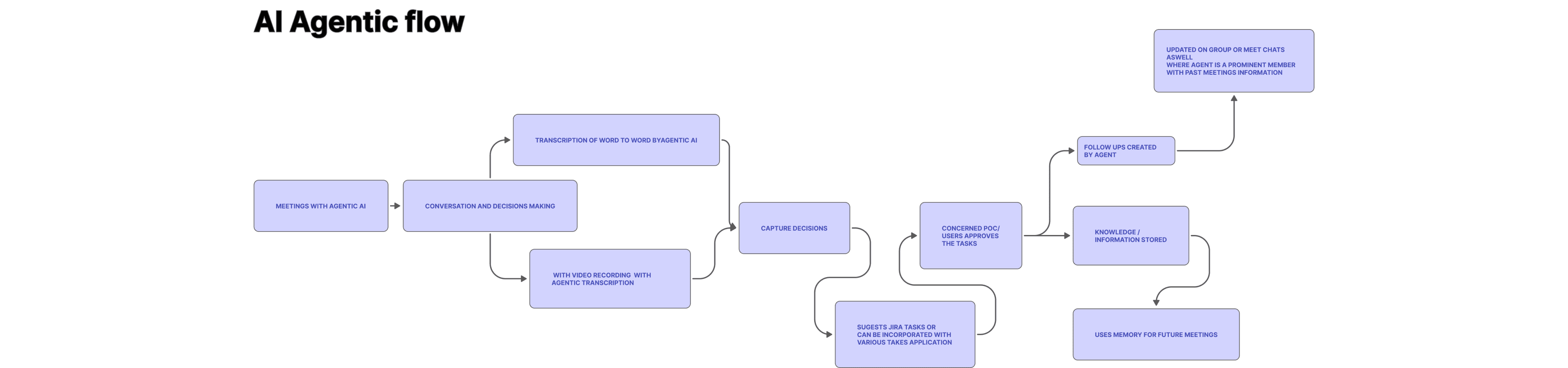
AI Agentic Flow
Real-time decision capture instead of post-meeting summaries
4.7
★★★★★
vs 3.2 summary-only
❌ Rejected: Better summary formatting
The problem is timing, not presentation. A more beautifully formatted post-meeting summary still arrives after the moment of action.
❌ Rejected: Real-time highlights
Highlights still require someone to act on them. The extraction burden doesn't go away. it just gets flagged instead of summarised.
✅ Chosen: Real-time capture + human confirm
Context becomes actionable at the moment it is created. API/token integration makes decisions flow immediately to execution systems.
85%
Post-meeting clarity improvement
20–30min
Manual work eliminated per meeting
4.7/5
Highest satisfaction of all features
Real-time
Not 24h later
Outcome
📈
85% improvement in post-meeting clarity when decisions were captured in real-time vs post-meeting summaries (participant-reported)
Manual post-meeting work estimated at 20–30 minutes per meeting eliminated
⭐
This feature received the highest satisfaction scores in cross-feature testing. 4.7/5 vs 3.2/5 for summary-only model
02
Decision 2 : Agent Presence
Why I made Ollie a persistent team member rather than a post-meeting report tool
And why presence changes trust
The original concept for Ollie was a post-meeting report tool which was just a bot that generates a structured summary at the end of each meeting and sends it to participants. It solved the accuracy problem. It did not solve the manual extraction problem. Nor did it solve the organizational memory problem.
Decisions are not made in a single meeting. They are made in fragments through a quick message, a comment mid-discussion, a follow-up chat two days later. No single post-meeting report captures the full picture. Ollie needed to be present across all of these moments, not just at the formal meeting end.
The design shifted from "report tool" to "persistent team member."
Before. Post-Meeting Bot
Before
After
Persistent team member and not a post-meeting report tool
4.6
★★★★★
vs 3.1 bot model
❌ Before. Report bot
Ollie appears only at the end of the meeting as a single notification card with a summary. Invisible during live discussion. Arrives after decisions are already made and half-forgotten.
✅ After. Persistent teammate
Ollie is always visible during meetings, in chat, and in follow-ups; just like a real team member. Present during the fragment moments where real decisions are made.
Decisions are not made in a single meeting. They are made in fragments. a quick message, a comment mid-discussion, a follow-up chat two days later. No single post-meeting report captures the full picture.
In the meeting
Ollie listed as a participant, always visible, capturing live
In chat
Responds to questions, recaps risks on demand, mid-discussion
In follow-ups
Continues the conversation post-meeting to keep everyone aligned
Outcome
⭐
Ollie's persistent presence was rated #2 value driver after real-time capture. 4.6/5 satisfaction vs 3.1/5 for post-meeting bot model
🤝
8/10 participants said they would immediately trust Ollie if Ollie was "just like another meeting attendee rather than a separate notification that appeared later"
💬
Users specifically cited "not having to remember who said what" and "follow-ups happening automatically in the moment" as the primary reasons for this preference
03
Decision 3 : Human Approval
Why nothing Ollie captures is committed without explicit human confirmation
And the enterprise trust constraint that shaped every interaction
In enterprise meetings, decisions carry real consequences which affect projects, budgets, and accountability. The obvious direction was full automation: Ollie captures a decision, creates a Jira task, assigns an owner, sends a notification. It is faster.
It is also the direction that destroys adoption in enterprise environments. Enterprise users will not adopt an AI agent that acts autonomously on decisions that affect their work and their teams. The trust model had to be explicit.
Ollie surfaces captured decisions and task assignments. But nothing is committed without the user explicitly confirming it. The agent assists memory. It does not replace judgment.
The Approval Notification Card
Approval Flow
Ollie Suggests
AI analyses and creates suggestions with full context
→
Review & Edit
User reviews details, edits content, adjusts owners, dates, priority
→
Approve / Reject
Approve to proceed or reject with reason. Full transparency.
→
Confirm Action
Approved items move forward to execution systems
Nothing moves forward without the human in the loop.
Built on Trust
Human in the Loop
People always stay in control. Always.
Full Visibility & Control
Audit every action. Clear, explainable and traceable.
Explainable AI
Every suggestion comes with context. why Ollie captured it, what it's based on.
Outcome
⚡
9/10 participants approved or rejected captured decisions within 20 seconds of notification. fast enough to maintain momentum while maintaining control
😌
Users reported feeling "in charge and not micromanaged". they could trust Ollie to capture accurately without worrying about accidental commits
🤝
Zero participants felt the human-in-the-loop requirement added too much friction. 7/10 said it was the reason they would actually use it
🧱
The human-in-the-loop constraint became the guiding principle for every Ollie interaction. Trust is treated as a design material, not an afterthought.
04
Decision 4 : Integration Layer
Why the connection to Jira, notifications, and follow-up systems matters more than the AI layer itself
The idea was right. The boundary was wrong.
The initial Ollie concept was designed to live entirely within the Teams meeting ecosystem where users could ask Ollie about past meetings, get decision summaries, and review captured items. When the concept was shared with users during idea validation calls, the response was immediate and consistent. People understood the value within seconds.
"This is great. But now I have to manually move it all to Jira."
Participant, idea validation session
The value of organizational memory is zero if it stays inside the meeting tool. Decisions need to flow to where work actually happens like task management, project boards, notification channels. The integration layer was not a nice-to-have feature. It was the entire point of capturing decisions in the first place.
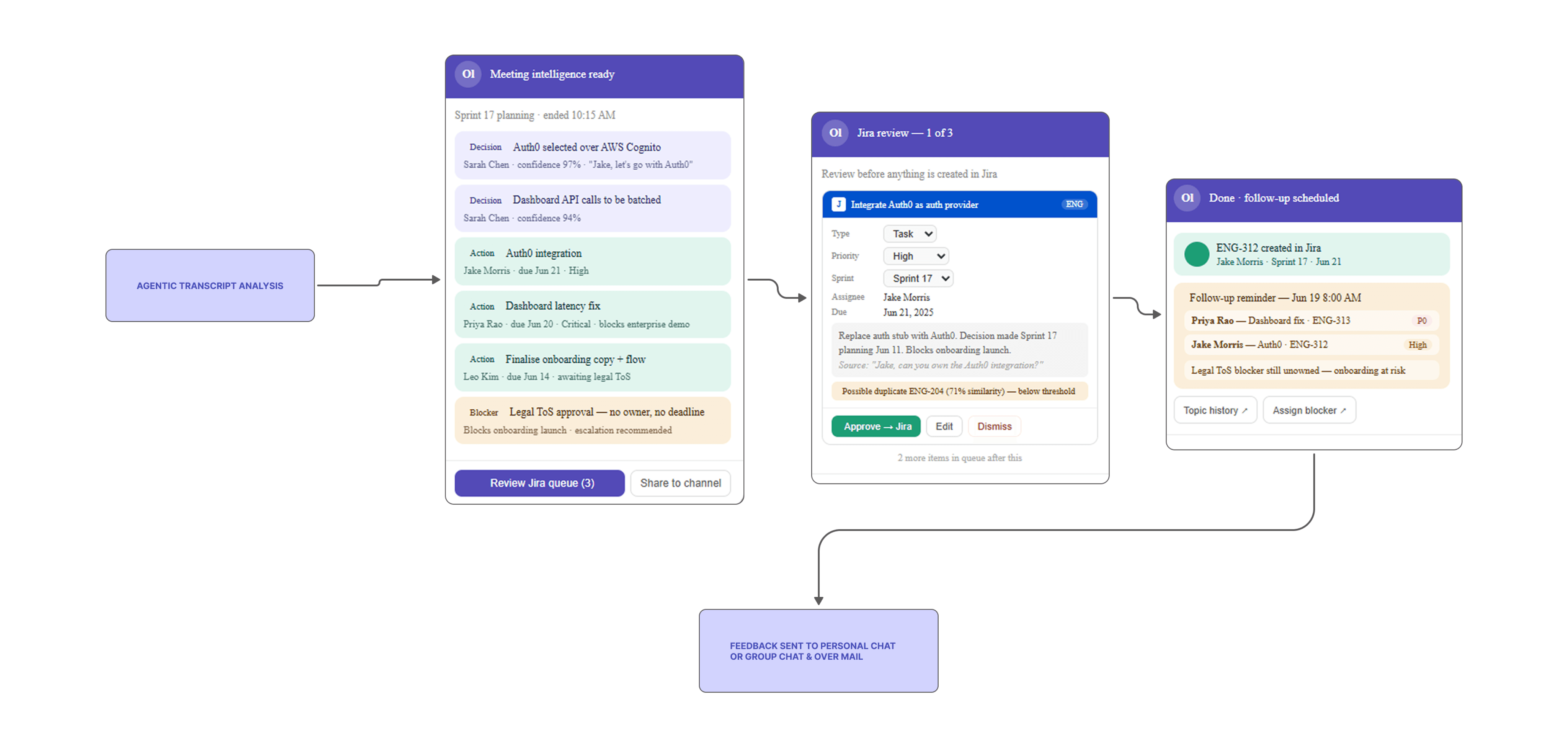
Sample Integration Flow
Sample Integration Flow
Integration Targets
Jira
Create tasks, link issues, map to sprints and projects automatically
Notifications
Notify members, update channels and individuals when tasks are assigned
Follow-up Engine
Smart reminders and follow-up nudges so nothing falls through the cracks
Progress Tracking
Track task progress and completion status across meetings and sprints
Outcome
⚡
By integrating captured decisions directly into Jira, task creation time dropped from 8–10 minutes of manual work per meeting to 30 seconds
📈
Users reported 90% higher task adoption when assignments arrived with context and prior approval rather than as isolated notifications
🎯
The integration layer became the moment decisions transformed from captured to committed and from memory to action
05
Decision 5 : Organizational Memory
Why I designed Ollie to make past decisions searchable, not just storable
And what that requires from the architecture
Storage and memory are not the same design problem. Storage means the information exists somewhere. Memory means you can retrieve the right information at the right moment without searching for it.
Ollie needed to be a memory layer, not a storage layer. which requires understanding the context of each interaction, not just recording the words.
Searchable memory not just storage
4.6
★★★★★
#2 value driver
😟 Storage (just text)
Teams transcript. a wall of text, no structure, impossible to search. Information exists somewhere. Retrieving the right piece at the right moment requires manual digging.
✅ Memory (structured decisions)
Ollie's decision history: organised by project, sprint, topic, owner, status. Searchable in natural language. Cross-meeting insights and related decisions surfaced instantly.
15–20s
Search retrieval ↓ from 5–10 min
73%
Could reconstruct rationale without rereading transcript
4.6/5
Rated 2nd highest value after real-time capture
Linked
Related decisions, Jira tasks, doc links surfaced together
Before
After
What Makes it Memory, Not Storage
Topic History
Every decision tagged by topic, project, and context. so Ollie knows what's related, not just what exists.
Decision History
Complete timeline of decisions across sprints and meetings, with rationale and context preserved.
Cross-meeting Search
Ask Ollie in natural language. Retrieve the exact decision from 3 months ago in seconds, not hours.
Stakeholders
Who was involved, who approved, who was assigned. always visible and linked to the original moment.
Project Context
Decisions surface with their full project and sprint context. not as isolated data points.
Insights & Patterns
Ollie surfaces patterns across meetings. repeated blockers, recurring decisions, ownership gaps.
Outcome
⚡
Search retrieval time for historical decisions dropped from manual 5–10 minute scrolls through chat threads to 15–20 seconds via structured memory
⭐
Users rated findable past decisions as the second-highest value added after real-time capture. 4.6/5 satisfaction
🧠
73% of users could reconstruct decision rationale without needing to reread full meeting transcripts. context preservation confirmed
Ollie : The Bigger Picture
Information Architecture
How Ollie turns conversations into clarity, actions and accountability. Evolution from a bot to Agentic.
User Journey
Meeting Happens
Conversations and discussions occur
→
Ollie Captures
AI listens and understands in real time
→
Insights Generated
Summary, decisions and actions surfaced
→
Review & Approve
You review and confirm
→
Actions Executed
Tasks created, people notified
→
Progress Tracked
Ollie follows up and keeps you updated
01
Teams Experience Layer
Where users interact with Ollie inside Microsoft Teams
Meetings
Real-time and scheduled meetings
Chat
1:1 or group chats with Ollie
Calendar
Upcoming meetings and schedule
Tasks
My tasks and assignments
Search
Universal search across knowledge
02
Ollie Core Experience Layer
Core capabilities that users engage with
Meeting Intelligence
AI summarizes meetings and extracts actionable insights
Meeting Summary
Decisions
Action Items
Risks & Blockers
Follow-ups
Timeline
Organisational Memory
Builds and connects knowledge across meetings and projects
Topic History
Decision History
Project Context
Stakeholders
Cross-meeting Search
Insights & Patterns
Workflow Hub
Turns insights into execution with structured workflows
Suggested Jira Tasks
Duplicate Detection
Sprint Mapping
Approval Queue
Task Tracking
Status Updates
Accountability Hub
Drives ownership and tracks commitments
My Tasks
Due Soon
Overdue Items
Team Commitments
Weekly Digest
Performance View
03
Human Review & Approval Layer
Ollie suggests, humans decide. Trust through transparency and control.
1. Ollie Suggests
AI analyses and creates suggestions. tasks, decisions, risks, follow-ups
→
2. Review & Edit
Users review details, edit content, adjust owners, dates, priority
→
3. Approve / Reject
Approve to proceed or reject with reason. Full transparency.
→
4. Confirm Action
Approved items move forward to execution systems
04
Execution & Integration Layer
Approved items flow to the right systems and people
Jira Integration
Create tasks, link issues, map to sprints and projects
Notifications
Notify members, update channels and individuals
Follow-up Engine
Smart reminders and follow-up nudges
Progress Tracking
Track task progress and completion status
05
Value & Insights Layer
Continuous intelligence that compounds over time
Team Insights
Team productivity, ownership and trends
Knowledge Growth
Richer knowledge base with every meeting
Decision Intelligence
Better decisions with historical context
Performance Impact
Focus on outcomes that matter
05+
Voice First Experience (Future)
Interact with Ollie naturally, by voice
Ask Ollie
Ask questions in natural language
Recall
Find past decisions and context instantly
Meeting Recap
Get summaries on demand
Task Status
Check task status and ownership
Built on trust
Human in the Loop
People always stay in control. Nothing is committed without explicit approval.
Transparency
Clear, explainable, and traceable. Every action has a visible reason.
Contextual Intelligence
Right information delivered at the right moment. not after the moment has passed.
Continuous Learning
Ollie gets smarter with every meeting. Memory compounds over time.
Privacy First
Enterprise-grade security, role-based access, and full data transparency.
Reflection
Core learning
I went into this project assuming the problem with meeting tools was quality. better transcription, better formatting, better summaries. I came out understanding that the problem is timing and trust.
A perfect summary delivered too late is useless. A perfect summary that commits actions without permission destroys adoption. Ollie's design is shaped entirely by those two constraints.
"The hardest tension in this project was designing for automation without removing human agency."
Every time Ollie acts autonomously, it saves time. Every time it acts without confirmation, it erodes trust. The approval flow is the answer to that tension. but it adds friction. In a real product context, I would want longitudinal research on where the confirmation threshold should sit: when users want Ollie to act automatically, and when they need to stay in control.
Right now, I've designed for maximum transparency and human control. In a production environment, once trust is established, the friction could be reduced drastically. but only with data showing where, when and how. That threshold will be different for different users, different organisations, and different types of decisions.
What Worked
Real-time decision capture. solved the right problem at the right moment
"—"
Persistent presence model. Ollie as a teammate, not a report tool
"—"
Human approval flow. became a trust feature, not a friction point
"—"
Integration layer. transformed captured into committed
"—"
Structured memory. searchable decisions in seconds, not minutes
Honest Trade-offs
Approval flow adds friction. optimizing the threshold needs longitudinal research
"—"
Integration layer designed but not prototype-tested. requires engineering validation
"—"
Voice-first experience is conceptual. no interaction testing conducted
"—"
Satisfaction scores are potential impact based on participant feedback, not final product metrics
Challenges
Designing for automation without removing human agency
"—"
Balancing transparency requirements with speed and usability
"—"
Enterprise trust is a design material. not an afterthought
"—"
4-week timeline without access to Microsoft's engineering environment
What Would Be Built Next
Test Ollie's approval flow longitudinally. find the right friction threshold per user type
"—"
Build and test the integration layer with real Jira API flows
"—"
Prototype and test the organisational memory search interface
"—"
Explore voice-first interaction. conceptual layer needs interaction testing
08 / RESULTS
Validated outcomes
15 participants across the three core validated decisions. Decisions 4–5 outcomes are projected based on architectural thinking and gap analysis.
Metric
Before
After
Change
Post-meeting work per person
20–30 min
3–5 min
↓ ~85%
Decision context retrieval time
5–10 min
15–20 s
↓ ~97%
Jira task creation time
8–10 min
30 s
↓ ~94%
Task adoption (with context + approval)
Baseline
90% higher
↑ 90%
Real-time capture satisfaction
3.2/5
4.7/5
↑ 47%
Decision Capture
4.7
★★★★★
Highest feature satisfaction score
Agent Presence
4.6
★★★★★
8/10 preferred persistent Ollie
Approval Flow
4.5
★★★★★
7/10 said it's why they'd use it
Memory Search
4.6
★★★★★
#2 value driver after capture
09 / REFLECTION
Core learning and honest trade-off
💡 Core Learning
The problem was timing and trust. not quality
I went into this project assuming the problem with meeting tools was quality. better transcription, better formatting, better summaries. I came out understanding that the problem is timing and trust .
A perfect summary delivered too late is useless. A perfect summary that commits actions without permission destroys adoption. Ollie's entire design is shaped by those two constraints.
⚖️ Honest Trade-Off
Automation saves time. Acting without confirmation erodes trust.
Every time Ollie acts autonomously, it saves time. Every time it acts without confirmation, it erodes trust. The approval flow is the answer to that tension. but it adds friction.
In a real product context, I would want longitudinal research on where the confirmation threshold should sit: when users want Ollie to act automatically, and when they need to stay in control. That threshold will differ by user, organisation, and decision type.
Right now, I've designed for maximum transparency and human control. In a production environment, once trust is established, the friction could be reduced. but only with data showing where, when, and how.
🚀 What's Next
Approval flow testing and real-time capture accuracy
Decisions 1–3 are usability-validated. The next step is testing Ollie's approval flow in a live meeting environment, measuring capture accuracy against real decisions, and defining the automation threshold with longitudinal data.
🔮 Future Layer
Voice-first experience
Interact with Ollie naturally. by voice. Ask questions in natural language, recall past decisions instantly, check task status across meetings, all hands-free. Conceptually designed; interaction testing is the next milestone before building.
Let's connect
Interested in working together?
I'm a Product Designer focused on building intelligent, research-grounded experiences that reduce cognitive load and drive real outcomes, whether the problem is human memory, enterprise trust, or AI autonomy.
Get in touch →